
Instagram DM Templates for Booking Enquiries
Copy 15 Instagram DM templates for service prices, availability, booking requests and confirmed appointments. Adapt them to your salon's process.
In this article
Instagram DM templates help you reply to questions about prices, available times and booking requests without writing each answer from scratch.
These 15 replies are written for independent hair stylists and salons handling booking conversations. Copy the one you need, replace the bracketed text and adjust it to match the conversation. You can send every template manually.
What should an Instagram booking reply include?
Answer the client’s question first, then ask for anything you need to take the next step. If a booking still needs your approval, call it a request. Call the appointment “confirmed” once you’ve approved and recorded it.
Before you copy a template:
- Replace the bracketed text with your business details.
- Check prices, service duration and available times against your current records.
- Write the month in words to avoid confusion over dates such as 10/11.
- Specify USD or CAD if the currency could be unclear, and say whether your price includes tax.
- Include your business’s time zone if the client may be elsewhere.
Read the conversation before sending. Remove any questions the client has already answered.
Templates for service and price enquiries
1. A new enquiry with very little detail
If someone asks to book without naming a service, start with a short question. You don’t need to send your whole service list.
Hi [name], thanks for getting in touch. Which service would you like to book, and is there a day or time that works best for you?
2. A question about a listed price
Hi [name], [service] is [price and currency] and takes about [duration]. That includes [what is included]. Would you like me to check available times?
Check that the listed price covers everything you describe. If the price depends on a consultation or service choice, use the next reply. A starting price isn’t a final quote.
3. A price that needs your assessment
A colour correction, for instance, may need a consultation before you can give an accurate quote. Ask for a detail that will help you decide what to recommend.
Thanks, [name]. Before I can give you a price, I need to know [relevant service detail]. Could you tell me [specific question]? I’ll review your answer before suggesting a service and price.
4. A client who is unsure which service to choose
Hi [name], I can help you choose. What would you like to have done? Is there anything about your current hair I should know before recommending a service?
If the answer still doesn’t clearly match a service on your menu, ask a follow-up question before recommending one.
Templates for availability and booking details
5. Offering available appointment times
Check that each opening has enough time for the full service.
I have [date and time] or [date and time] available for [service]. All times are local to [business location]. Which would you prefer? I’ll review your request before confirming the appointment.
These are options, not a confirmed appointment. Check your calendar again when the client replies, especially if it’s been a while.
6. When the requested time is unavailable
I don’t have an opening for [service] at [requested time]. I can offer [alternative one] or [alternative two]. Would either work, or would you like me to check another day?
If you have no suitable alternatives, replace the last two sentences with “Would you like me to check another day?” Keep old times out of saved replies, and avoid promising a waitlist place or cancellation you can’t offer.
7. Collecting missing contact details
Once the client has chosen a service and time, collect any missing contact details.
You’d like [service] on [date] at [time]. Could you send your full name and phone number, including the country code, so I can record your request?
Only ask for details you need for the booking. If your booking page collects them, send the link to save the client entering them twice.
8. Checking the details before submitting a request
Just to check: you’d like [service] on [date] at [time], at [location]. The price is [price and currency], and the appointment takes [duration]. Does that all look right? Once you agree, I’ll submit your booking request.
If a detail changes, send the updated summary and ask the client to agree again.
Templates for requests and confirmed appointments
Use the pending reply while you review a request. Send a confirmation once you’ve approved it.
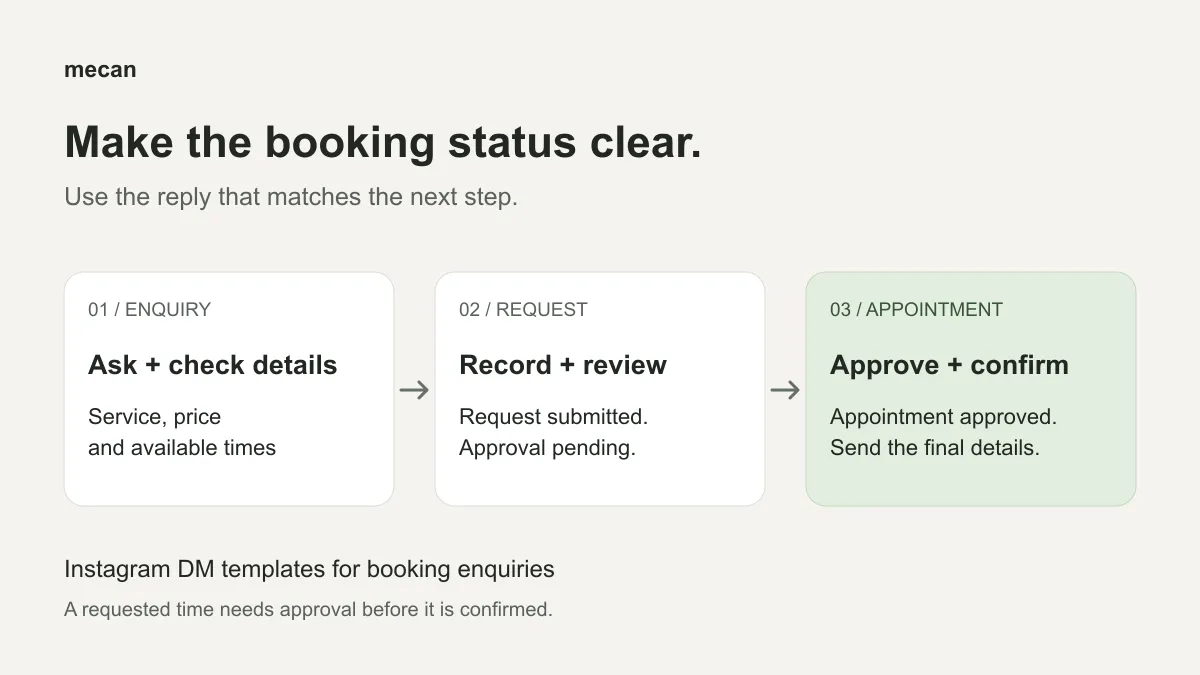
9. A request has been submitted and needs approval
Record the request before sending this reply.
Thanks, [name]. I’ve received your request for [service] on [date] at [time]. I still need to approve it, so your appointment isn’t confirmed yet. I’ll get back to you once I’ve reviewed it.
Save “you’re all set” for an approved appointment. A client could reasonably read it as confirmation.
10. You have approved the appointment
After approval, send the final appointment details.
You’re confirmed, [name]. Your [service] appointment is on [date] at [time], at [address]. Please [any necessary preparation]. If you need to discuss a change, contact me through [your actual contact route].
Delete the preparation sentence if there’s nothing to prepare. Only mention automatic appointment changes if your booking process supports them.
11. A question about your booking or cancellation policy
Keep this wording consistent with the policy on your booking page or website.
My policy for [topic] is [plain-language explanation]. You can read the full details at [policy location]. If your situation needs a closer look, please tell me before we go ahead with the request.
Use your actual fees and notice periods. If you haven’t decided how to handle a situation or exception, review it yourself before answering.
Templates for personal review and other next steps
12. An enquiry needs your personal review
Some service decisions, photos and unusual requests need your judgement.
Thanks for explaining, [name]. I need to look this over myself before suggesting a service or time. [One specific detail you still need, if any.] I’ll get back to you once I’ve checked it.
Remove the bracketed sentence if you have everything you need. This is a manual reply; review any photos or voice notes yourself.
13. A client would rather use your booking page
You can choose your service and request a time here: [booking link]. I’ll review the request before confirming it. If you’re unsure which service to choose, tell me what you’d like to have done and I can help.
Answer any outstanding service or price questions before sending the client to your booking page.
14. A client asks to reschedule an appointment
Thanks for letting me know, [name]. What date or time would work instead? I’ll check the options and confirm any change with you. Your appointment is still at the original time for now.
Check the options yourself. Once you’ve agreed on the change and updated your calendar, send the client their new appointment details through your usual contact route.
15. Setting expectations for manual replies
Thanks for your message. I reply to booking enquiries during [your message-review hours]. Please send the service you’re interested in and your preferred day. I’ll look over the details when I next check my messages.
Use hours you can stick to. Only promise a specific response time if you can meet it consistently.
How do you use Instagram saved replies and quick replies?
Keep a small set of Instagram saved replies or quick replies for the questions you answer most often. Label them by purpose, such as “price,” “availability,” “contact details,” “pending request” or “confirmed appointment.” Store them in a note or a saved-reply tool if your inbox has one.
Choose a reply, fill in the brackets and read it before sending. You’ll still need to send the message yourself.
A greeting can stay the same for months, but available times need checking for each conversation. Update your saved replies whenever your prices, services, address, policies or booking process change.
Before sending, check that the information is current, the reply answers the client’s question and the booking status is correct.
Can the same templates be used for automatic replies?
You can adapt the wording for automatic replies. To check availability or create a booking request, though, an automation tool needs access to your calendar and booking system. It also needs accurate business information and rules for what it should handle.
Mecan Desk answers Instagram enquiries using your business information and published reply rules. It can check availability in your Mecan calendar, collect the details for a booking request and submit it for your approval. You decide which requests become confirmed appointments.
Desk also has a public booking page. It uses its own calendar, so keep your existing appointments and blocked time up to date in Mecan. You’ll still need to answer questions that require your judgement.
Start with the replies you use most often. If you’re ready to automate routine booking enquiries, see how Desk handles Instagram booking enquiries.