
How to Manage Instagram Booking Requests
Choose between Instagram DMs and a booking link, check availability, collect client details and turn enquiries into appointment requests with Mecan Desk.
In this article
To handle Instagram booking enquiries, help the client choose a service, check availability and record their request. You can do this in DMs or through a booking link. Choose the route that answers their question with the least back-and-forth.
Some clients know which appointment they want. Others need a price or help choosing a service before they’re ready to book. For an independent hair stylist, sending every enquiry a link can leave those questions unanswered; arranging every appointment by hand repeats work you could simplify.
Mecan Desk can answer routine Instagram enquiries and collect requests in DMs. Its public booking page lets clients submit a request themselves. Both routes use the same Mecan calendar.
Should clients book in Instagram DMs or through a link?
Keep the conversation in DMs when the client needs help deciding. Offer a booking link when they’re ready to choose from your listed services and times. You can make both routes available without asking someone to complete both.
On smaller screens, scroll the tables sideways to see all columns.
| Route | Best suited to | What you need to maintain |
|---|---|---|
| Manual DMs | Enquiries that need your assessment, such as a colour correction or an unclear service request | Current prices, appointment availability and a record of the agreed details |
| Automated DMs | Routine questions about listed services, prices and available appointments | Accurate business information, service durations, calendar records and a way to hand questions to you |
| Public booking link | Clients who know what they want and are ready to choose a service and time | A clear service menu and an up-to-date booking calendar |
A client might ask a price question in a DM, then use your link once they have the answer. Another may complete the request in the conversation. In either case, collect the details once and save the request in your booking calendar.
If you handle replies manually, use our Instagram DM templates for booking enquiries. They cover prices, availability and missing details without requiring automation.
Is a booking link the same as Instagram’s Book Now button?
A booking link is a URL to your booking page. You can share it in your profile links or send it in a conversation. A native Book Now action button uses a supported provider’s connection to Instagram. For example, Square documents an integration with Square Appointments.
Mecan Desk provides a public booking page you can share by link. It does not provide that native Book Now integration. If the button is a requirement for your Instagram booking system, check the provider’s current documentation before choosing it.
What should happen between an enquiry and an appointment?
1. Match the enquiry to a service
If your menu has several haircut options, ask which one the client wants before offering a time. The choice determines the price and how long the appointment needs to be.
Give the listed price and explain what it includes. If you need a consultation before quoting, tell the client. An automated reply shouldn’t invent a price or assess a photo; those enquiries need your review.
2. Check appointment availability
Your opening hours show when you operate. Check existing appointments and blocked time before offering a slot.
A 90-minute service needs a continuous 90-minute opening. An empty start time isn’t enough if another appointment begins before the service would finish.
Desk checks availability against the services, operating hours, bookings and blocked time recorded in Mecan. Appointments kept only in another calendar won’t appear automatically. Add those appointments or block that time in Mecan before relying on the offered slots.
3. Collect the missing client details
Once a time suits the client, collect the details needed to record the request:
- The selected service and its price.
- The appointment date and start time, in the business’s time zone.
- The client’s name and phone number, including the country code.
- Their agreement to the proposed appointment details.
If the client has already supplied their name or chosen a service, don’t ask for it again. Write the month in words when replying to avoid ambiguous dates, and identify USD or CAD where the currency could be unclear.
4. Record the request
A time offered in a DM isn’t reserved. Check availability again before saving the agreed details in your booking calendar, especially if the client replies later.
When Mecan saves a booking request, it reserves capacity for that service and time. The request stays unconfirmed until you approve it. Tell the client they’ve requested the appointment and that confirmation will follow after review.
5. Review and confirm
Review the service, time and client details before approving. In Desk, your approval changes the request to a confirmed appointment and triggers its confirmation message.
If the appointment needs a different service or time, speak with the client and agree on the change. Don’t assume an earlier request authorizes a different appointment, or that an automated reply has confirmed it for you.
A worked example: two routes into one calendar
Suppose you offer a 90-minute cut and finish, and Tuesday, October 6 at 2:00 p.m. is available in your business’s time zone.
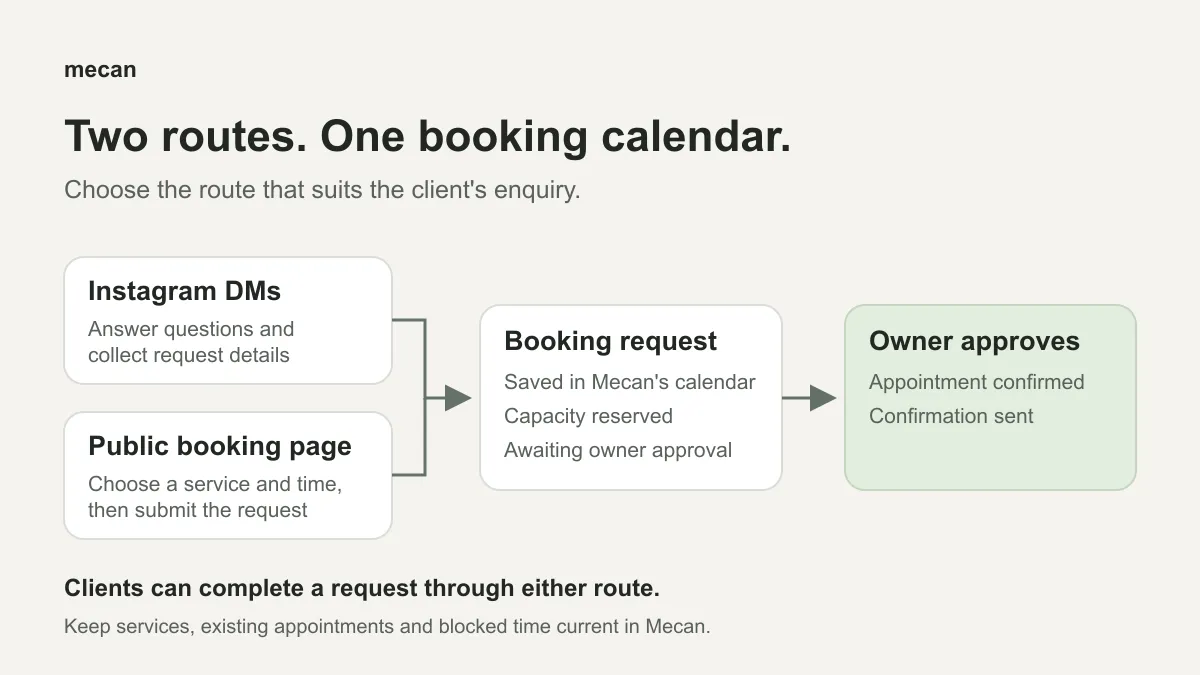
| Stage | Through Instagram DMs | Through the public booking page |
|---|---|---|
| Choose the service | Desk answers a routine enquiry using your configured information and clarifies the service | The client selects the listed service |
| Choose the time | Desk checks availability and offers a suitable time | The client selects a displayed available time |
| Provide details | The client supplies missing name and phone details and agrees to the appointment summary | The client enters their details, verifies their phone number and submits |
| Record the request | A successful request appears in Mecan awaiting approval | The page shows “Booking requested,” and the request appears in the same calendar |
| Confirm | You review and approve; the appointment becomes confirmed and its confirmation is sent | You review and approve; the appointment becomes confirmed and its confirmation is sent |
For a solo calendar that accepts one appointment at a time, the saved request reserves 2:00 p.m. to 3:30 p.m. while you review it. Both routes check that reservation when offering times and saving requests. They can only account for appointments and blocked time recorded in Mecan.
What should you prepare before using Desk?
Before you turn on automatic replies or share your booking page:
- Check your published services, prices and durations.
- Set your business’s time zone and operating hours.
- Record existing appointments and block unavailable time in Mecan.
- Make your business information and reply rules clear, including which questions need your review.
- Plan when you’ll review incoming booking requests.
Clients can use the public booking page to submit a request without arranging every detail with you by message or phone. Desk doesn’t answer phone calls.
Desk doesn’t support separate staff calendars, booking payments or synchronization with another calendar or POS system. If those are requirements, check for them before choosing a tool.
Can clients request an appointment outside opening hours?
Yes. Desk can handle routine Instagram enquiries and accept requests outside your business’s opening hours. Clients can also submit through the public booking page. The appointment times offered still depend on your configured operating hours and calendar availability.
Requests submitted at night still need your approval. Give clients an exact confirmation time only if you can meet it.
Use fewer manual replies to collect booking requests
Desk can handle routine Instagram questions about services and available times, then gather the details for a request. Enquiries that need your assessment still come to you.
See how Mecan Desk handles booking enquiries. For replies you can use today, keep the Instagram DM template library alongside this guide.